
Let AI Prioritize Leads, Manage Follow-Ups & Close Conversations
Still reading every WhatsApp chat to figure out who’s ready to buy?
Actionable AI reviews your WhatsApp conversations to understand customer interest, marks leads as Hot, Warm, or Cold based on your rules, and updates their CRM ratings and lead scores. It also identifies conversations ready to close, helping your team focus on leads that need attention.
It can also prepare or automatically send follow-ups when customers stop replying. You control each capability separately, including when agents review an action and when AI handles it automatically.
🆕 Features
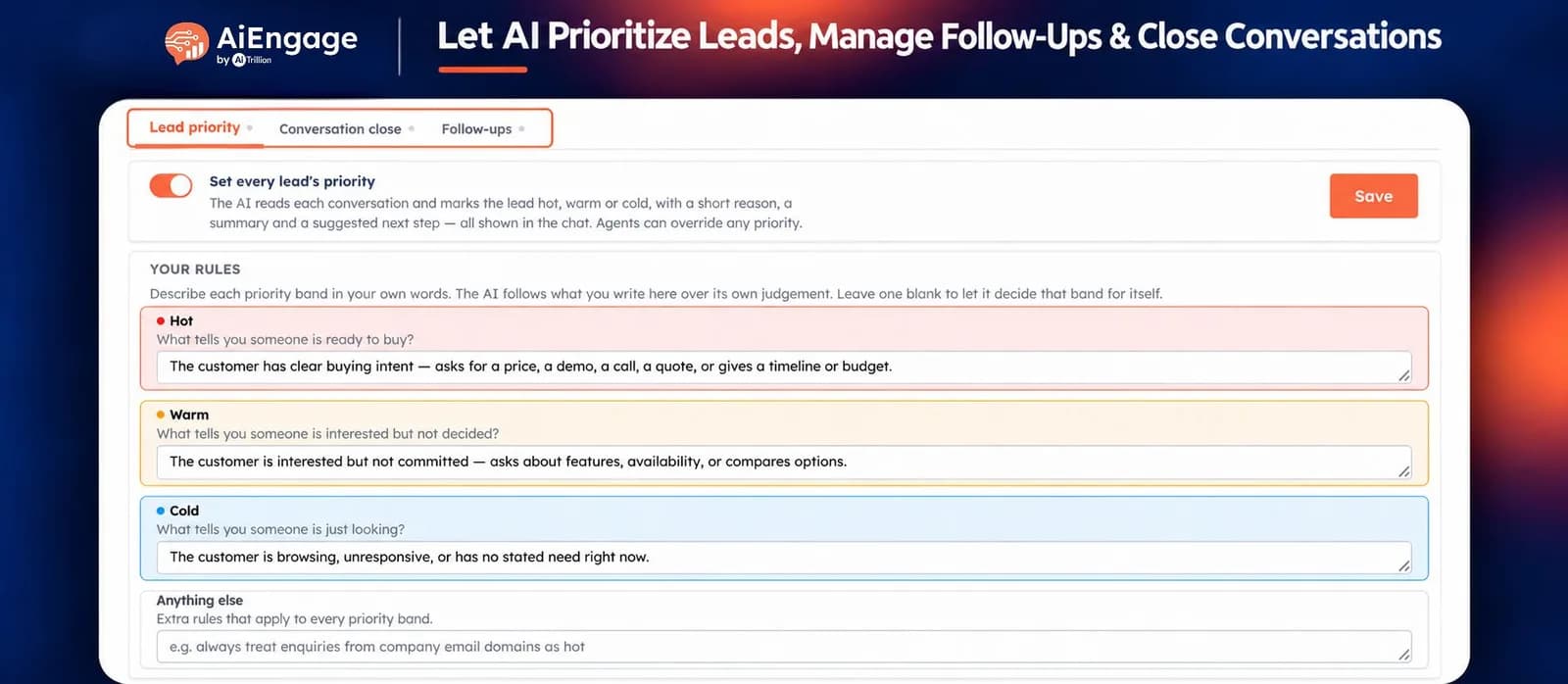
Automatically Mark Leads as Hot, Warm or Cold
AI reviews conversations and assigns a priority based on the buying signals you define.
For example, your rules could classify leads as:
Hot: Asking for a quote, requesting a demo, confirming a budget, or discussing a purchase timeline.
Warm: Exploring features, checking availability, or comparing options.
Cold: Browsing with no immediate requirement or clear buying intent.
Each priority appears in the inbox with a short reason, a conversation summary, and a suggested next step.
Your team can review the assessment and manually override the priority whenever needed.
Define Lead Priority Rules for Your Business
Describe what each priority means in plain language. You can also add instructions that apply across all three categories.
For a real estate team, you could define:
Hot: A buyer shares their budget, preferred location, and plans to book a site visit this week.
Warm: A buyer asks for property options and amenities while comparing projects.
Cold: A person browses listings without a stated purchase requirement or timeline.
AI uses these rules to assess conversations consistently.
Customer Conversation → AI Reviews Your Rules → Priority Assigned → Suggested Next Step
Save Ratings & Lead Scores to Contact Records
You can choose whether AI also saves its assessment to the linked contact.
Rating: Save the Hot, Warm, or Cold priority.
Lead Score: Save a number from 0 to 100 representing AI’s confidence in its assessment.
These fields can help your team filter contacts, build segments, and review leads by rating and score.
The Lead Score reflects classification confidence. Qualified Lead Detection separately updates Lead Status, so both features can work together.
Suggest or Automatically Close Conversations
AI can identify conversations that match your configured closing reasons and help clear them from the open inbox.
Choose how it acts:
Suggest, and let an agent decide: AI adds a note explaining why the conversation may be ready to close.
Close it automatically: AI marks the conversation as Solved and records the reason.
Possible reasons include:
Wrong number
Explicitly not interested
Spam or irrelevant messages
Already purchased and needs no further assistance
Other reasons defined by your business
AI must match an enabled closing reason before taking action.
Define Which Conversations Must Stay Open
Set exceptions to protect conversations that still need your team’s attention.
For example, instruct AI to keep a conversation open when the customer:
Requests pricing or availability
Asks for a demo, callback, or site visit
Raises a question or objection that needs an answer
Is waiting for information your team promised
You can also specify how AI should handle uncertainty. Stay-open exceptions take precedence over closing rules.
Control Reopening & Human Overrides
Agents can reopen an AI-closed conversation whenever needed.
You can also allow AI to reopen conversations it previously closed when new context meets your configured confidence threshold.
Set the confidence required for AI reopening
Let agents correct closure decisions
Keep manually closed or manually reopened conversations outside further AI closure handling
This keeps your team in control of conversation status.
Prepare Contextual Follow-Ups When Leads Go Quiet
When an agent or AI sends a message, and the customer stops replying, Actionable AI can prepare the next follow-up.
You define the goal for each step, such as:
Offer a call or demo slot
Ask whether the customer needs more information
Help address a pending decision
Check whether they still need assistance
AI writes the message using the conversation context and the customer’s language.
Set Different Follow-Up Sequences by Lead Priority
Create separate follow-up sequences for:
Hot leads
Warm leads
Cold leads
Leads not yet rated
Each sequence has its own enable/disable control. Within each step, you can set the waiting period and the message goal.
For example, a Hot real estate lead could receive a follow-up offering a site visit, while a Warm lead could receive a message asking which property details would help them decide.
Choose Agent Review or Automatic Sending
Control who sends the follow-up.
Draft Mode: AI prepares the message in the conversation for an agent to review and send.
Automatic Mode: AI sends according to your configured timing and business hours.
Agents can pause follow-ups on individual conversations. A customer reply stops the remaining sequence immediately.
For steps that may fall outside WhatsApp’s customer-service messaging window, configure an approved template.
Manage Business Hours, Daily Limits & AI Usage
Set limits around how frequently AI evaluates conversations and takes action.
You can configure:
Minimum conversation length before assigning priority
Number of recent messages AI reviews
Waiting time before a priority check
Maximum priority checks per day
Confidence required for automatic closure
Maximum closures and follow-ups per day
Business hours for follow-up sending
Priority checks use AI credits. These controls help manage usage and the volume of automated activity.
You can also choose to mark a conversation Solved after its follow-up sequence finishes without a reply.
❤️ Why You'll Love It
Clear Lead Priorities: See Hot, Warm, and Cold leads directly in the inbox.
Consistent Assessments: Apply your business’s criteria across conversations.
Connected CRM Data: Save ratings and AI confidence scores to contact records.
Relevant Follow-Ups: Prepare messages based on what the customer actually discussed.
Less Inbox Administration: Suggest or automate closure of conversations that meet your rules.
Flexible Automation: Enable priority, closure, and follow-ups independently.
Human Control: Review drafts, override priorities, reopen chats, and pause follow-ups.
🎯 Use Cases
Real Estate Enquiries: Mark buyers with a clear budget and site-visit intent as Hot, then follow up with a relevant next step.
Sales Demos: Prioritize prospects requesting a demonstration and prepare follow-ups when they go quiet.
Education Admissions: Identify students discussing fees, admission timelines, or counselling appointments.
Travel Enquiries: Prioritize customers sharing travel dates, destinations, and budgets.
Quote Follow-Ups: Ask interested prospects whether they need help deciding after receiving pricing.
Inbox Cleanup: Close wrong-number, spam, and explicitly uninterested conversations according to your rules.
Lead Nurturing: Use different follow-up goals for Hot, Warm, Cold, and unrated leads.
For more details on configuring Actionable AI, visit our Help Center or contact our support team.
New to AiEngage CRM? Sign Up