Add Targets to Your Reports
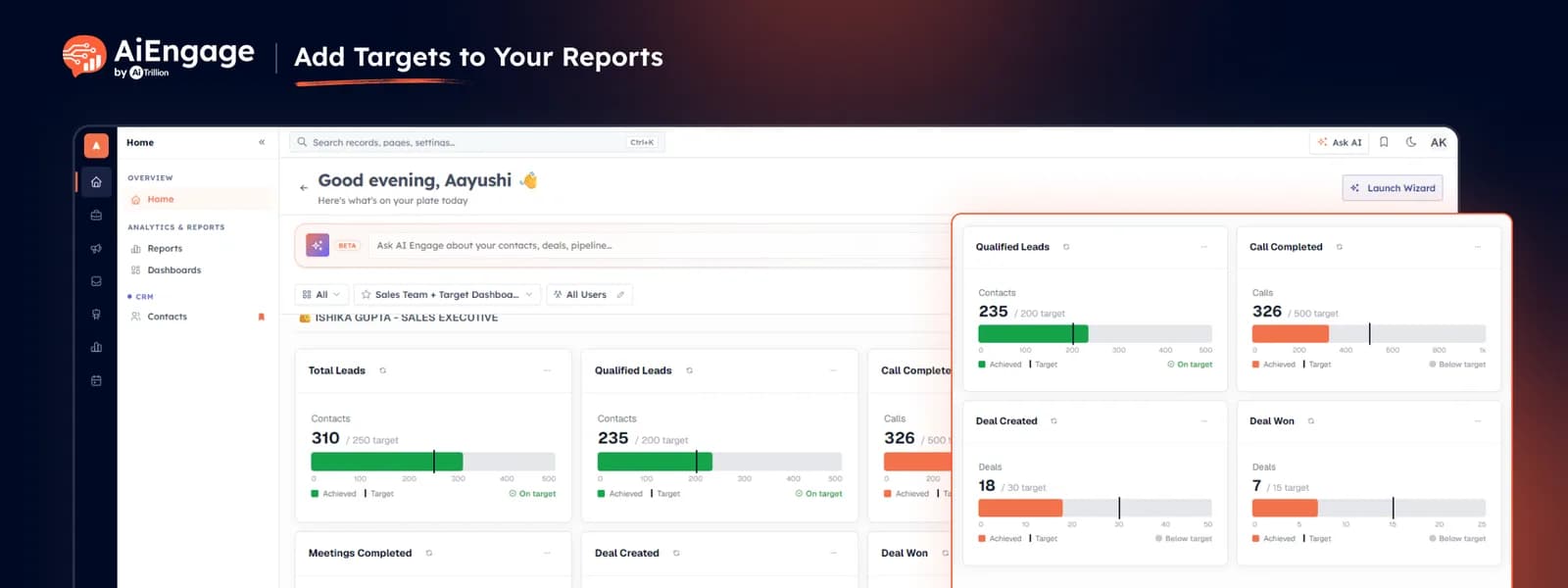
With the new Target component in Reports, you can now add target-based widgets directly to your dashboard and see actual performance against expected goals in one place.
🆕 Features
Add Target Components to Your Reports
Create target-based report components for the metrics your team actually works toward, such as:
New installations.
Upsells.
MRR.
One-time revenue.
Qualified meetings.
New clients.
Calls completed.
Deals won.
Trial stores.
Other custom performance metrics.
Each target card can show the achieved value, target value, progress bar, and current position against the goal, making it easier to understand performance without manually calculating how far the team is from target.
Learn how to track progress with Target Meter
Compare Performance Across Teams and Users
Target components can be added to different dashboards for sales, customer success, or other teams. You can also build user-specific sections to compare individual performance against assigned targets, helping managers quickly see who is on track and where attention is needed.
Operator Corrections in Reports
We have also improved report operators so calculations, comparisons, and metric logic work more accurately across report components — helping ensure the numbers shown in dashboards reflect the intended conditions and calculations more consistently.
❤️ Why You’ll Love It
Track Goals in One Place: see actual performance and targets together inside the same dashboard.
Know What Needs Attention: quickly identify metrics that are still below target.
Measure Individual Performance: compare team-member results against assigned goals.
Reduce Manual Reporting: avoid maintaining separate spreadsheets just for target tracking.
More Reliable Reports: operator corrections improve the accuracy of report calculations and conditions.
🎯 Use Cases
Sales Targets: track meetings, deals, revenue, and new clients against monthly goals.
Customer Success Targets: monitor installations, upsells, MRR, and account-growth targets.
Individual Performance: create target components for each salesperson or team member.
Management Dashboards: see overall team performance and individual targets from one report.
Monthly Reviews: quickly compare achieved numbers with planned targets during performance reviews.
For more details on enabling and using this feature, visit our Help Center or contact our support team.
New to AiEngage CRM? Sign Up