Start Every Day With An AI Daily Briefing
Start your workday knowing what happened yesterday and what needs your attention today.
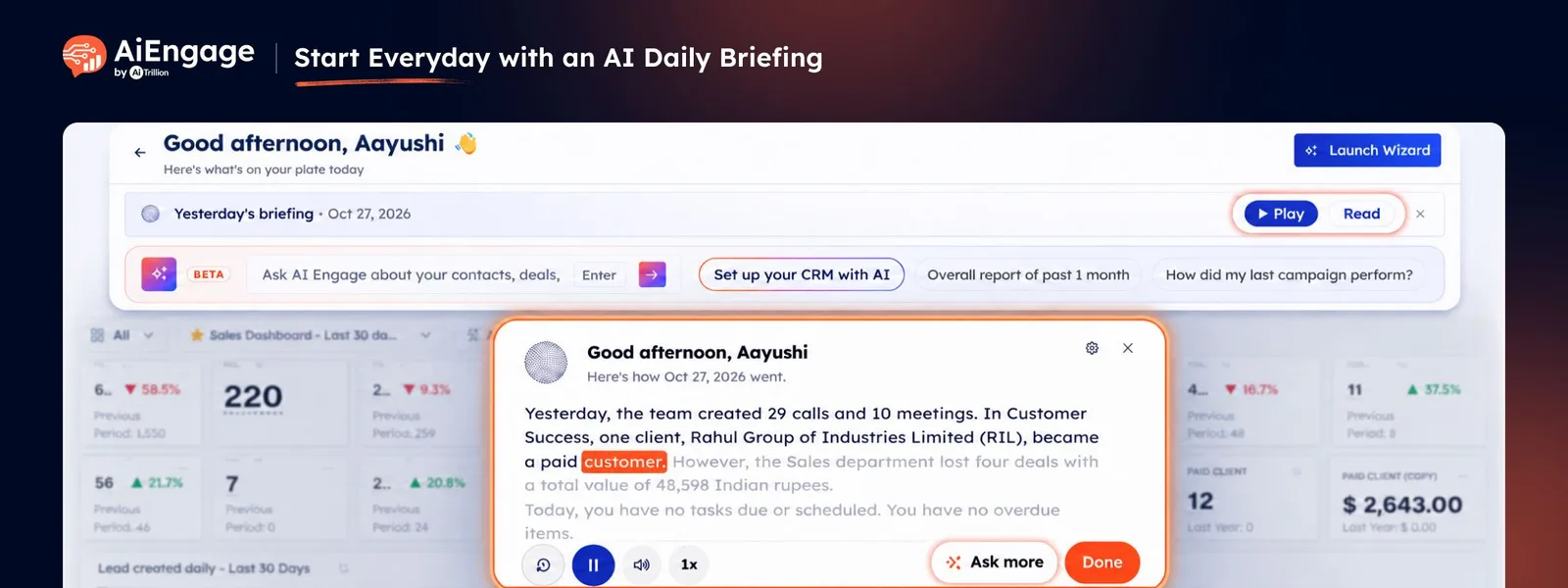
With Daily Briefing in AiEngage CRM, AI reviews the activity you are allowed to see and prepares a personalized summary directly on your dashboard. Listen to it in a natural AI voice, read it on screen, revisit it later, or ask AI follow-up questions when you want more detail.
The briefing can highlight important activity such as deals that moved, calls and meetings, pending follow-ups, team activity, and other updates relevant to your role.
🆕 Features
Get an AI Summary When You Open Your Dashboard
When you open the AiEngage CRM dashboard for the first time each day, Daily Briefing can prepare a summary of the previous day's activity.
Instead of checking multiple modules and reports separately, you get a quick overview in one place.
Review important activities from yesterday.
See deals and records that moved.
Catch important calls, meetings, and follow-ups.
Understand what may need attention today.
Get the briefing directly from your Home dashboard.
On Mondays, the briefing can cover activity from the weekend instead of only the previous day.
Listen to Your Briefing in a Natural AI Voice
Daily Briefing can read the summary aloud while showing the full text on screen.
As the briefing plays, you can follow along with the written summary and use playback controls based on how you prefer to consume it.
Listen to your briefing instead of reading reports.
Follow the text while the AI voice reads.
Pause or resume the briefing.
Replay it from the beginning.
Mute the voice when needed.
Adjust the playback speed.
This gives you a quick way to catch up while starting your workday.
Read the Briefing Instead of Listening
Need to check your update quietly?
You can open the same Daily Briefing as text without playing the voice.
Read the complete briefing at your own pace.
Review the same information included in the spoken summary.
Open linked CRM records directly from the briefing.
Switch back to audio whenever needed.
This is useful when you are in a meeting, shared workspace, or simply prefer reading.
Ask AI Follow-Up Questions
Your briefing does not have to stop at the summary.
Use Ask more to continue the conversation with AiEngage AI and explore the information in greater detail.
You can ask questions such as:
Which deals moved yesterday?
Which leads need follow-up today?
What did my team complete?
Which calls or meetings should I review?
What should I focus on next?
The briefing context is passed into the AI conversation so you can dig deeper without starting from scratch.
Personalize What Your Briefing Focuses On
Different people need different information at the start of the day.
Daily Briefing lets you customize the type of summary you want by adding your own prompt.
You can tell AI:
What information to focus on.
Which type of activity should appear first.
How detailed the briefing should be.
What tone you prefer.
Which business metrics or records matter most to you.
For example, a sales manager might ask AI to start with team deals and follow-ups, while a business owner may want an overview of activity across the organization.
Choose Who Gets Daily Briefings
Admins can control which profiles in the organization receive Daily Briefing.
This allows businesses to enable the feature for the teams or roles where it is most useful.
Turn Daily Briefing on or off at the organization level.
Select which profiles receive it.
Set organization-level defaults.
Let users personalize their own briefing when allowed.
This gives administrators control while keeping the experience relevant for each user.
Open Important CRM Records from the Briefing
Daily Briefing can reference relevant CRM records inside the summary.
When supported records appear in the briefing, you can open them directly to continue working.
For example, you may hear that a particular deal moved or that a customer needs follow-up, then open that record to review the details.
This helps turn the briefing from a simple summary into a starting point for the day's work.
❤️ Why You'll Love It
Start the Day Informed: Quickly understand what happened before deciding what to work on.
AI-Generated Summary: Let AI bring important CRM activity together for you.
Personalized by Role: Receive information based on the records and teams relevant to you.
Listen or Read: Choose the format that works best at that moment.
Custom AI Prompts: Tell AI exactly what you want your daily summary to focus on.
Ask Follow-Up Questions: Go deeper into any update directly with AI.
Built Into Your Dashboard: Get the briefing where you already start your work.
Easy to Revisit: Return to the same briefing later in the day.
Connected to CRM Records: Move from an AI summary directly into the work that needs action.
Admin Controls: Decide which teams or profiles receive Daily Briefing.
🎯 Use Cases
Business Owner Morning Overview: Get a quick summary of activity across sales, customer conversations, calls, and meetings.
Sales Manager Briefing: Review deals that moved, team activity, and follow-ups that need attention.
Sales Representative Daily Plan: See your own recent activity and understand which leads or deals to focus on.
Management Updates: Catch up on important work without opening multiple CRM reports.
Follow-Up Planning: Identify customers, deals, or tasks that may require action today.
Call Review: See notable call activity from the previous day.
Meeting Review: Catch up on meetings and related activity.
Deal Monitoring: Understand which opportunities progressed or may require attention.
Team Performance Visibility: Give managers a faster way to review relevant team activity.
Monday Catch-Up: Start the week with a summary of activity from the weekend.
For more information, visit the AiEngage CRM Help Center or contact the AiEngage CRM support team.
New to AiEngage CRM? Sign Up