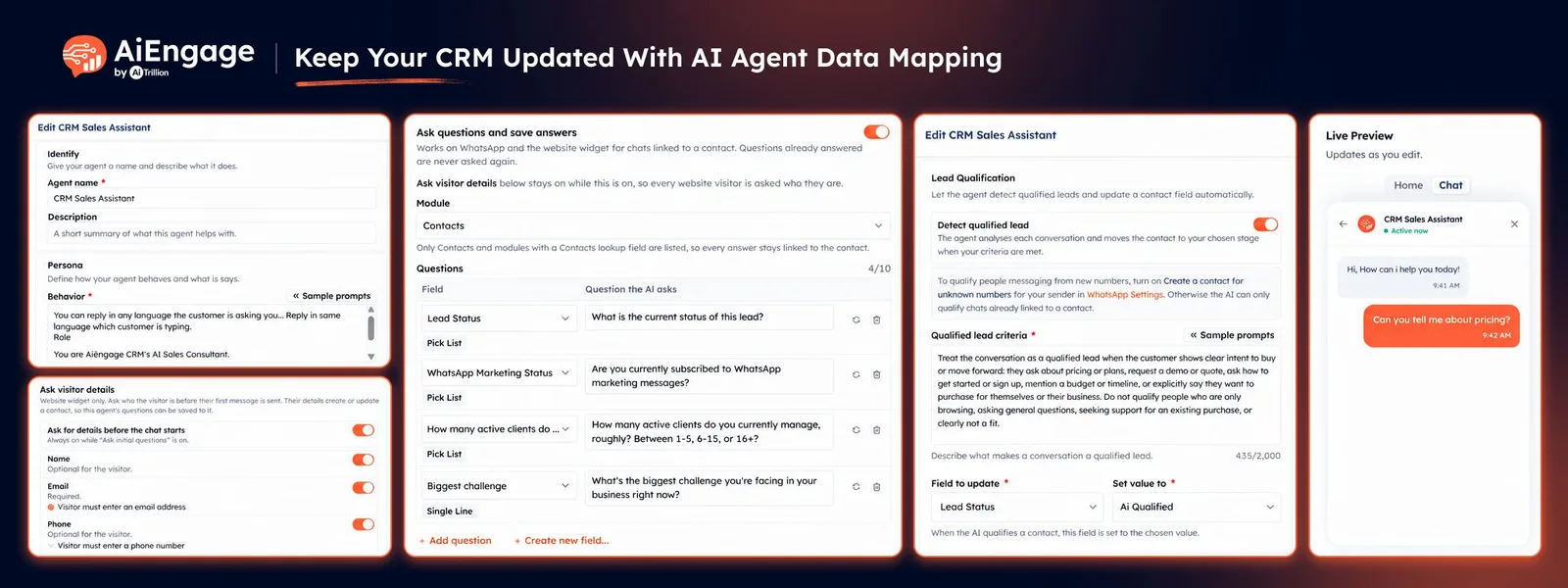
Keep Your CRM Updated With AI Data Mapping
Customer conversations often contain valuable information your team needs later, such as what a customer wants, their budget, preferred product, service requirement, or buying timeline.
With Data Mapping for AI Agents in AiEngage CRM, your AI agent can ask relevant questions during a conversation and automatically save the customer's answers into the right CRM fields.
Instead of asking your team to read conversations and manually copy information into the CRM, the AI can collect and organize that data while the conversation is happening.
🆕 Features
Let Your AI Agent Collect Customer Information During Chats
Configure the information you want your AI agent to collect from customers.
During a conversation, the AI can naturally ask those questions when they fit the discussion.
Ask customers for relevant information during the conversation.
Collect details without using a rigid form.
Let the AI decide when a question fits naturally into the chat.
Keep the conversation conversational instead of asking every question in a fixed order.
Avoid asking questions when the information is already known.
This helps your AI agent collect useful CRM data while continuing to assist the customer.
Automatically Save Answers into CRM Fields
Each question can be connected to a specific CRM field.
When the customer provides an answer, AiEngage CRM saves that information directly into the mapped field.
For example, your AI agent could collect:
Product or service interest.
Budget.
Preferred start date.
Location.
Requirement type.
Number of users.
Preferred plan.
Buying timeline.
Other business-specific information.
This removes the need for someone to review every conversation and manually update the CRM afterward.
Choose Where the Collected Data Is Stored
You can decide which CRM module should receive the answers collected by your AI agent.
Answers can be saved directly to Contacts or to supported modules connected to the contact.
For example:
Contacts
Companies
Deals
Course Enquiries
Property Enquiries
Other custom modules connected to Contacts
This allows businesses to organize AI-collected information around their own CRM structure.
Map Each Question to the Right Field
Each data-mapping question connects to one field in your selected module.
Choose the field first, and AiEngage CRM can help generate a suitable question for it.
For example:
CRM Field: Course Interested In
AI Question: Which course are you most interested in?
Or:
CRM Field: Preferred Start Date
AI Question: When would you ideally like to start?
The customer's response is then stored in the corresponding field automatically.
Create New CRM Fields While Configuring the Agent
Sometimes the information you want your AI agent to collect does not already have a field in your CRM.
Authorized users can create a new field directly while configuring data mapping.
You can choose supported field types such as:
Text.
Long text.
Number.
Decimal.
Percent.
Dropdown.
Multi-select.
Yes/No.
Date.
Email.
Phone.
Website URL.
Once created, the field becomes available for the mapped question.
This makes it easier to build the CRM data structure around the information your AI agent collects.
Capture Website Visitor Details Before Saving Answers
For website AI Agent conversations, the chat needs to be connected to a CRM contact before mapped answers can be saved.
AiEngage CRM can ask website visitors for identifying information such as:
Name.
Email.
Phone number.
You can choose which visitor details are requested and which ones are required.
Once the visitor is connected to a contact, the AI can save additional mapped answers to that customer's CRM record.
Capture Answers on Website and WhatsApp Chats
Website AI Agents: A conversation must be connected to a CRM contact before mapped answers can be saved. Configure which visitor details to request, such as name, email, and phone number, and choose which are required.
WhatsApp AI Agents: When the conversation is linked to a CRM contact, the AI can save answers to the mapped fields. The customer's WhatsApp number can be used to identify the contact.
🎯 Use Cases
Real Estate Lead Qualification: Collect property type, preferred location, budget, bedroom requirements, purchase timeline, and financing needs, then save the answers to the relevant enquiry record.
Education & Course Enquiries: Capture course interest, preferred batch timing, start date, learning preference, and budget directly from AI Agent conversations.
Sales Lead Qualification: Save details such as product interest, company size, requirements, budget, timeline, and buying intent into CRM fields automatically.
Service Enquiries: Collect the service required, preferred appointment date, location, budget range, and other requirements before your team follows up.
Travel Enquiries: Capture destination, travel dates, number of travellers, budget, hotel preferences, and trip type from customer conversations.
Financial Service Enquiries: Collect service interest, investment requirements, preferred consultation time, customer category, and other relevant qualification details.
WhatsApp Lead Capture: Let your AI Agent qualify WhatsApp leads and automatically save important answers to the customer's CRM record.
Website Lead Qualification: Collect visitor details and save answers about their requirements while they chat with your website AI Agent.
Custom CRM Data Collection: Map AI Agent questions to custom fields and modules based on the information your business needs to collect.
Reduce Manual CRM Updates: Automatically turn customer chat responses into structured CRM data so your team does not have to copy information manually.
For more information, visit the AiEngage CRM Help Center or contact the AiEngage CRM support team.
New to AiEngage CRM? Sign Up