Connect Your Existing WhatsApp Number & Manage Conversations in AiEngage CRM
Want to manage customer replies, chat assignments, and follow-ups from your existing WhatsApp number? Now, you can bring your current business number into the CRM and use it for shared inbox conversations, chat assignments, AI replies, and customer follow-ups. Customers continue contacting the same number listed on your website, invoices, and business materials. Your team gets the tools to manage incoming conversations together.
🆕 Features
Bring Your Existing WhatsApp Number into the CRM
Connect a number your business already uses through the WhatsApp setup flow in AiEngage CRM. Depending on your current setup, this can include:
A number used on the WhatsApp Business App
A WhatsApp Business Platform number connected through another provider
An eligible landline or office number verified by phone call
The connection process depends on where your number is currently registered. Complete the applicable migration steps before activating it in AiEngage.
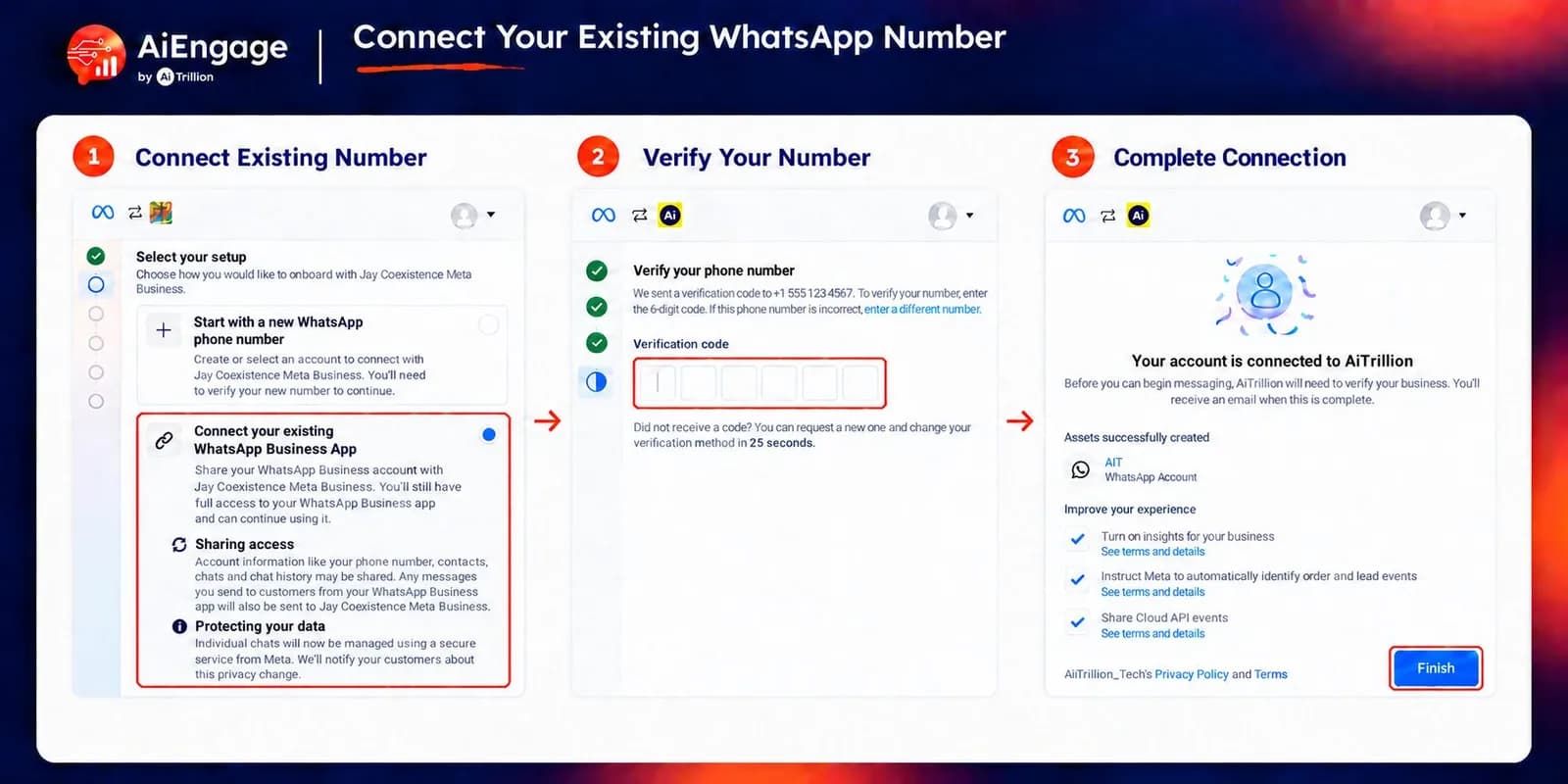
Connect Through the Guided Meta Setup
Start from Settings → Marketing Channels → WhatsApp and select API request or Add another number. The guided setup lets you:
Sign in with your Facebook business administrator account.
Select your business portfolio.
Choose an existing WhatsApp Business Account where applicable.
Select or enter your existing number.
Verify the number by SMS or phone call when required.
Complete the connection and monitor registration status.
Choose Your Existing Number → Complete Meta Setup → Verify & Activate → Manage Conversations in CRM.
Keep Your Existing WhatsApp Business Account Where Applicable
If your number already uses the WhatsApp Business Platform through another provider, you can select your existing WhatsApp Business Account during setup, where supported. Keeping the same account helps retain account-level assets such as approved message templates.
Before switching, confirm account ownership, access, and migration requirements with your current provider. Review any template placeholders and map them to AiEngage contact fields where needed.
Give the Right Team Access to Your Number
Choose who can view and reply to conversations on each connected number. Available access options include:
All team members
Specific teams
Specific users
For example, make your existing support number available to the Support team and give your sales number to selected sales representatives.
Automatically Assign Incoming Conversations
Configure how new chats are assigned once your number is connected.
Enable automatic assignment for new chats.
Assign known contacts' conversations to their existing contact owner.
Use your configured automatic assignment as a fallback.
Keep conversations in the shared queue when automatic assignment is disabled.
This helps incoming enquiries reach the people responsible for handling them.
Add an AI Agent to Your Existing Number
Enable an AI agent to respond to customers messaging your connected number. You can:
Turn AI replies on or off for the number.
Select the AI agent that should respond.
Add a signature to AI-generated replies.
Let a team member take over the conversation when needed.
Your existing business number can support AI-assisted conversations alongside your team's replies.
Create Contacts Automatically from New Chats
When an unknown number messages your business, AiEngage can automatically create a CRM contact. Configure:
Whether unknown numbers create contacts
The owner assigned to new contacts
The lead source recorded for those contacts
This helps your team capture new enquiries and keep them connected to customer conversations.
Manage Sending Preferences for Each Number
Control how each connected number is used.
Add additional countries the number can message.
Enable strict opt-in-only sending.
Rename the sender for easy identification.
Set a default number for sends where no sender is specified.
Disconnect and reconnect a sender when needed.
If you manage multiple numbers, each can have its own access, assignment, and AI configuration.
Track Connection & Activation Status
View the registration status directly on the number's card. Statuses include:
Pending
In Progress
Approved
Failed
Disconnected
If registration fails, review the displayed reason and retry after resolving it. Once the number is approved, test an incoming message and a CRM reply before your team starts using it.
❤️ Why You'll Love It
Keep Your Familiar Number: Customers can continue messaging the business number they already have.
Shared Team Access: Let authorized team members manage conversations together.
Clear Conversation Ownership: Route chats using automatic assignment and contact ownership.
AI-Assisted Replies: Enable an AI agent on your connected number.
Automatic Lead Capture: Create contacts from new incoming chats.
Flexible Number Management: Configure access and sending preferences separately for each sender.
Connected Customer Context: Manage WhatsApp conversations alongside your CRM records.
🎯 Use Cases
Established Businesses: Bring the number already printed on your website and invoices into AiEngage.
Growing Support Teams: Give multiple support agents access to a business number previously handled by one person.
Sales Teams: Route returning prospects' conversations to their assigned contact owner.
Provider Transitions: Connect an existing WhatsApp Business Platform number through the applicable migration process.
AI-Assisted Enquiries: Let an AI agent answer incoming questions on your established number.
Multiple Departments: Manage separate sales and support numbers with their own access and assignment rules.
Before you switch: Existing chat history is not imported through this connection flow. Export important conversations and confirm the migration requirements before making changes to your current setup, including whether app access will end and whether a service interruption is expected.
For more details on connecting your number, visit our Help Center or contact our support team.
New to AiEngage CRM? Sign Up