Let Customers Book Meetings on Their Own, Based on Your Availability
How often does scheduling a meeting turn into: "Are you free tomorrow?" "What time works for you?" "Can we do 4 PM instead?"
That back-and-forth is exactly what the Calendar feature in AiEngage CRM is designed to remove.
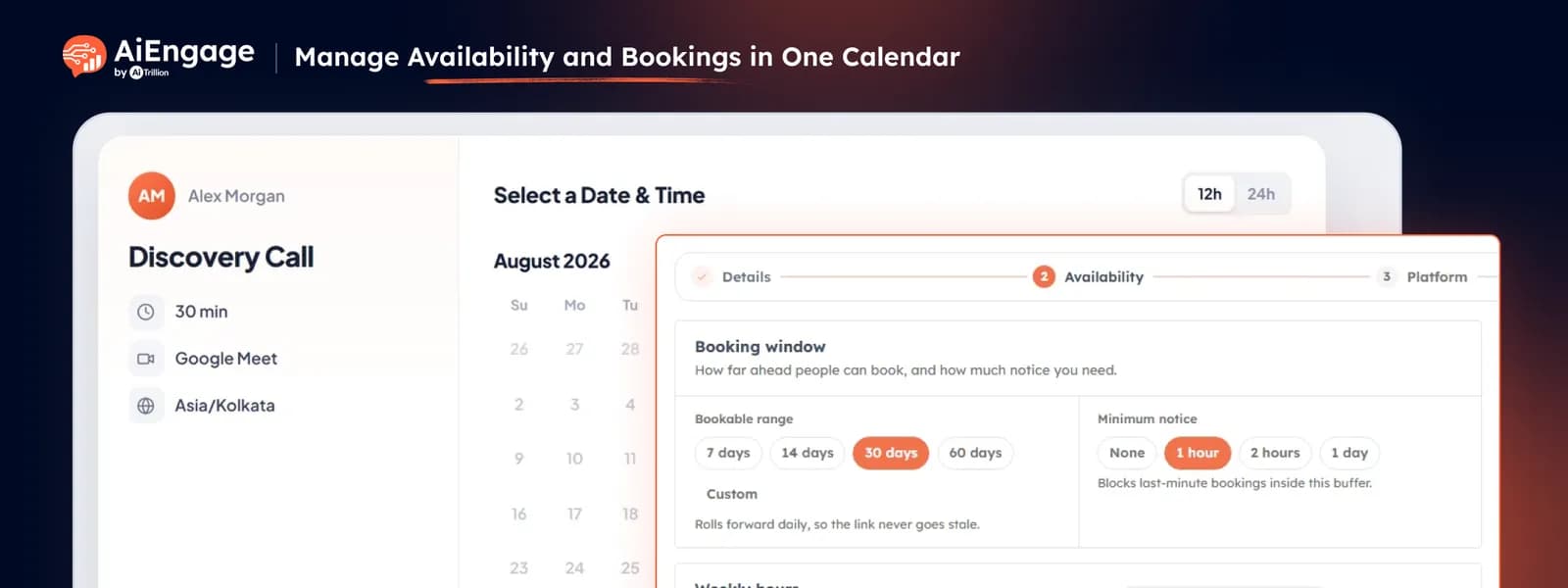
With AiEngage CRM Calendar, you can create your own booking calendars, set your availability, and share your booking link with customers. Customers can then view your available time slots and book a meeting at a time that works for them — without waiting for your team to coordinate every slot manually.
You can also embed your booking calendar directly on your website, making it easy for visitors to book demos, consultations, onboarding calls, support meetings, or other appointments directly from your website.
Once a customer books a meeting, the appointment is automatically added to your AiEngage CRM Calendar, giving your team one place to manage upcoming meetings and bookings.
🆕 Features
Create & Manage Your Booking Calendars
Create booking calendars based on how your team wants to schedule meetings with customers.
You can create separate calendars for different purposes, such as:
Sales demos.
Consultations.
Customer onboarding.
Support calls.
Product training.
Discovery calls.
Other customer meetings.
Each calendar can have its own booking settings and availability, giving you flexibility to create different scheduling experiences for different teams or meeting types.
Set Your Availability
Define exactly when customers can book time with you or your team.
Set your available days and working hours, and customers will only see the time slots that are available for booking.
This helps your team:
Avoid bookings outside working hours.
Control when customers can schedule meetings.
Keep personal and working schedules organised.
Let customers choose a convenient time themselves.
Reduce manual coordination between teams and customers.
Instead of asking customers when they are available, simply share your booking calendar and let them choose an available slot.
Share Your Booking Calendar With Customers
Once your calendar is ready, share your booking link with customers wherever they interact with your business.
You can share your booking link through:
WhatsApp messages.
Emails.
Website CTAs.
Sales follow-ups.
Team email signatures.
Marketing campaigns.
Customer conversations.
Customers can open the link, view your available slots, and book a meeting directly.
No more "What time works for you?" conversations.
Learn how to share your booking link
Embed Your Calendar Directly on Your Website
Want customers to book meetings directly from your website?
You can embed your AiEngage CRM booking calendar into your website, allowing visitors to view available slots and schedule a meeting without leaving your website.
This is ideal for:
Book a Demo pages.
Contact Us pages.
Sales landing pages.
Consultation pages.
Customer onboarding pages.
Support or appointment pages.
Instead of sending visitors to another scheduling tool, you can give them a booking experience directly on your website.
Create Different Booking Experiences
You can create separate booking calendars for different types of meetings and teams.
For example:
Book a Demo → Sales team.
Talk to an Expert → Consultant.
Customer Onboarding → Customer Success team.
Support Call → Support team.
Product Training → Training team.
This allows each team to have its own scheduling experience and availability while keeping everything connected to AiEngage CRM.
Manage All Bookings From Your CRM Calendar
Once customers book meetings through your booking calendar, your team can manage those appointments directly inside AiEngage CRM.
Use the Calendar to see:
Today's meetings.
Upcoming bookings.
Available schedules.
Busy days.
Weekly schedules.
Monthly meeting activity.
Your team can quickly understand what is scheduled, who they are meeting, and what is coming up next.
❤️ Why You’ll Love It
Less Scheduling Back-and-Forth: let customers choose an available time themselves instead of coordinating manually.
Set Your Availability: decide exactly when customers can book meetings with you or your team.
One Booking Link: share your calendar through email, WhatsApp, sales conversations, and other channels.
Embed on Your Website: let website visitors book meetings directly from your website.
Multiple Booking Calendars: create separate calendars for demos, consultations, onboarding, support, and other meetings.
Better Customer Experience: give customers a simple way to find a suitable time and book instantly.
Keep Everything in CRM: manage customer bookings and scheduled meetings from your AiEngage CRM Calendar.
Save Your Team Time: reduce the manual work involved in finding a suitable meeting time.
🎯 Use Cases
Book a Demo: add your booking calendar to your website and let prospects choose their own demo time.
Sales Consultations: share a booking link with leads so they can schedule time with the right salesperson.
Customer Onboarding: create a dedicated calendar for onboarding and implementation calls.
Customer Training: let customers schedule product training sessions based on your team’s availability.
Support Calls: allow customers to book support or consultation slots without lengthy coordination.
Website Book-a-Demo: embed your booking calendar directly into your website’s demo or contact page.
WhatsApp Follow-Ups: send a booking link instead of manually coordinating dates and times.
Email Scheduling: add your booking link to emails and let customers schedule a meeting at their convenience.
Multi-Team Scheduling: create separate booking calendars for sales, support, onboarding, and customer success teams.
For more details on enabling and using this feature, visit our Help Center or contact our support team.
New to AiEngage CRM? Sign Up