Re-Engage the Right Audience with Targeted Follow-Ups
Your campaign is sent. Some contacts clicked, some replied, and others never opened it. How do you follow up with each group? With Campaign Retargeting in AiEngage CRM, you can select an outcome from a sent Email or WhatsApp campaign and create a follow-up for those contacts. AiEngage copies the original campaign into a draft with the selected audience ready for review. You can also save that audience as a live segment that keeps updating as campaign results change.
🆕 Features
Create Follow-Up Campaigns Directly from Analytics
Open a sent campaign, choose an eligible result, and select Retarget Campaign. AiEngage CRM creates a draft with a copy of your original campaign and the recipients who matched that outcome at the time.
Start from a sent Email or WhatsApp campaign.
Select an outcome with at least one recipient.
Create a follow-up draft for that audience.
Review and edit the message.
Send immediately or schedule for later.
Open Campaign Results → Select an Audience → Create Follow-Up Draft → Review & Send.
Follow Up Based on Email Engagement
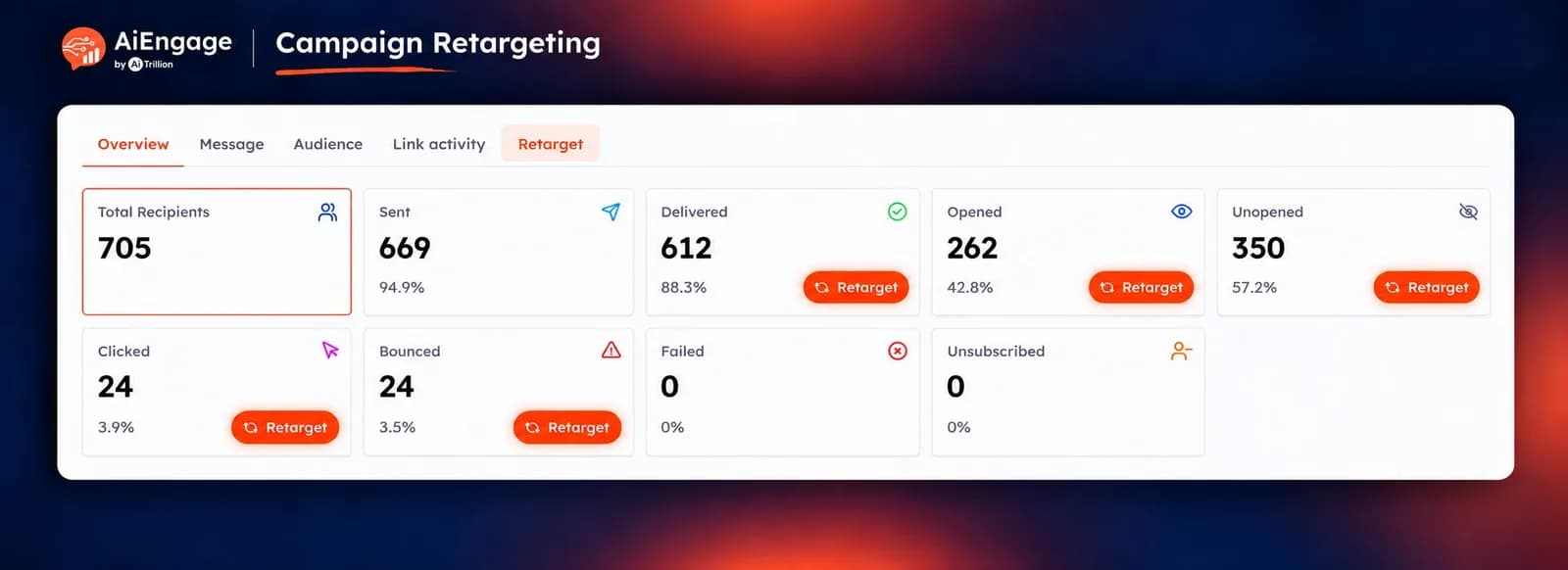
Choose your audience based on how recipients responded to your email campaign. Available outcomes include:
Delivered: People who successfully received the email.
Opened: People who opened the email.
Unopened: People who received the email but have not opened it.
Clicked: People who clicked a link.
Bounced or Failed: People whose message did not arrive.
For example, select Unopened to create a follow-up with a fresh subject line, or select Clicked to send interested contacts a relevant next step.
Retargeting is available for eligible outcomes with recipients. Total Recipients and Sent are excluded.
Retarget WhatsApp Campaign Audiences
You can also create follow-ups from WhatsApp campaign results. Choose from outcomes such as:
Delivered: Contacts who received the message.
Read: Contacts who read it.
Replied: Contacts who responded.
Failed: Contacts whose message could not be delivered.
This helps your team tailor the next message to the customer's response. For failed messages, review and resolve the delivery issue before retrying.
Save Campaign Audiences as Live Segments
Select Create Segment when you want to reuse a campaign audience. The saved segment updates as more contacts match the selected campaign outcome, making it useful for ongoing follow-ups.
Save people who clicked a campaign.
Build a reusable audience of email openers.
Group contacts who replied to a WhatsApp campaign.
Use the segment in future campaigns.
Keep membership updated as results change.
A retarget campaign uses a fixed audience captured when the draft is created. A live segment continues updating.
Review Every Follow-Up Before Sending
Every retarget campaign starts as a draft, giving your team time to tailor the message. You can update:
Subject line
Message content
Sender
Sending schedule
For example, a follow-up to non-openers can use a new subject line, while a campaign for contacts who clicked can offer a demo or a consultation. Creating the draft does not send the campaign.
Track Follow-Ups from the Original Campaign
Retarget campaigns stay connected to the campaign they came from. In the campaign list, you can see:
The generated retarget campaign name
The outcome used to select its audience
The original campaign name
Channel, status, and recipient count
The original campaign's Retarget tab lists its follow-up campaigns, including their status, audience metric, creation date, and recipient count. You can open each follow-up directly from this view.
Build Further Follow-Ups from New Results
You can retarget a follow-up campaign using its own results. For example, after sending a reminder to non-openers, you can create a more relevant next message for those who clicked the reminder. AiEngage keeps the campaign relationships connected so your team can trace each follow-up back to its source.
❤️ Why You'll Love It
More Relevant Follow-Ups: Choose recipients based on actual campaign engagement.
Faster Campaign Setup: Create a draft with the selected audience already included.
Less Manual List Work: Build audiences directly from campaign results.
Email & WhatsApp Support: Follow up across both campaign channels.
Reusable Audiences: Save live segments for future campaigns.
Full Sending Control: Review the message and schedule before it goes out.
Clear Campaign History: See which follow-ups came from each original campaign.
🎯 Use Cases
Missed Announcements: Send a revised follow-up to contacts who have not opened your email.
Demo Invitations: Invite contacts who clicked your product campaign to book a demonstration.
WhatsApp Follow-Ups: Send a relevant next message to contacts who read or replied to your campaign.
Deadline Reminders: Follow up with recipients who received an event or registration announcement.
Delivery Retries: Retry failed messages after correcting the underlying delivery issue.
Ongoing Nurturing: Save engaged recipients as a live segment for future campaigns.
Note: Use unsubscribed audiences only for exclusion segments. Allow time for engagement results to develop and keep follow-up frequency reasonable.
For more details on enabling and using this feature, visit Marketing & Campaigns or contact Help Center or support team.
New to AiEngage CRM? Sign Up