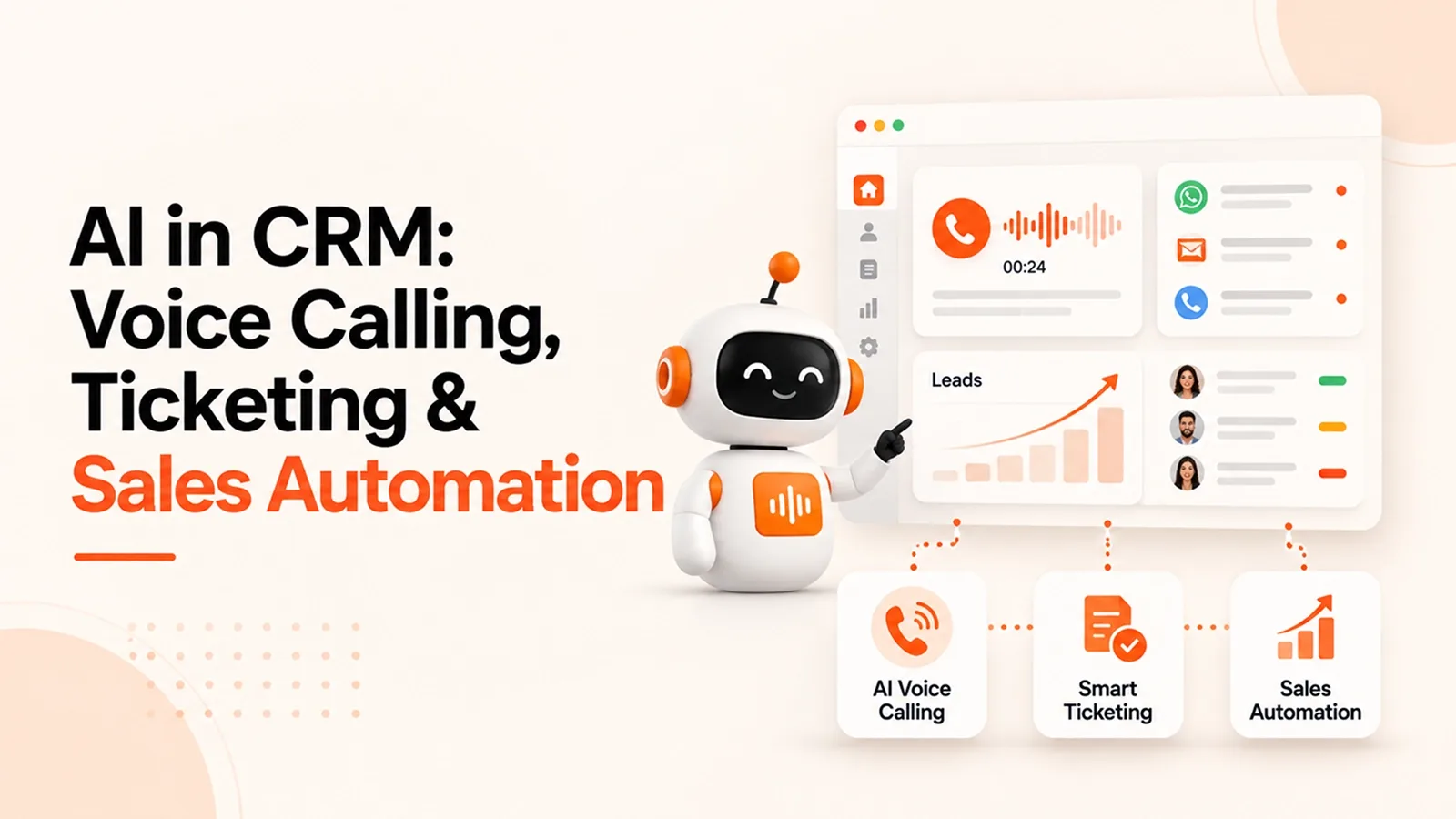
AI in CRM: Voice Calling, Ticketing & Automated Sales Ops
Discover how AI in CRM automates voice calling, ticket management, lead follow-ups, and sales operations to improve customer support and sales efficiency.
- 1What Does AI in CRM Actually Mean?
- How AI CRM Differs from a Traditional CRM
- The Core AI Technologies Behind It
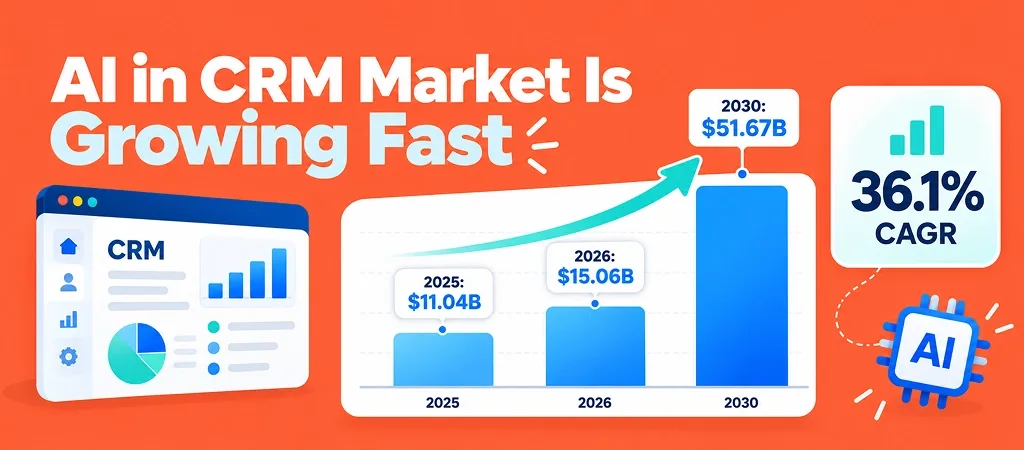
- Market Insight: Why Demand for AI CRM Is Growing
- 2Key AI Capabilities in CRM: Voice Calling, Ticketing & Sales Ops
- AI Voice Calling in CRM
- AI-Powered Ticketing and Customer Support
- Automated Sales Ops with AI CRM
- 3How Voice, Ticketing, and Sales Ops Work Together
- 4Case Studies: How Businesses Are Using AI CRM
- Urban Nest Realty: Stopping Lead Loss from Missed Calls with AI Voice Calling
- GlowRoot Naturals: Cutting Support Response Time by 80% with AI Ticketing
- SkillBridge Academy: Doubling Counselor Productivity with Automated Sales Ops
- 5Measurable Benefits of AI in CRM
- 6Challenges and Limitations to Know Before You Adopt
- Data Privacy and Call Recording Compliance
- Data Quality and Integration Issues
- When Human Judgment Still Matters
- 7How to Choose the Right AI CRM for Your Business
- 8How AiEngage CRM Brings Voice, Ticketing, and Sales Automation Together
- 9FAQs
- Question: Can AI in CRM replace human sales reps?
- Question: Is AI voice calling legal for sales outreach?
- Question: How does AI ticketing prioritize support requests?
- Question: Is an AI CRM suitable for small businesses?
- Question: How long does it take to set up an AI-powered CRM?
Rohan Malhotra runs a growing home interiors firm, and business is good. His ads bring steady enquiries, and his team of ten really cares about customers.
Yet every evening his CRM shows the same thing: missed calls, unread WhatsApp messages, and hot leads nobody has touched.
His CRM saves everything, but it doesn't act on any of it.
Rohan is a composite of the founders our AiEngage team speaks with every week. If his story sounds familiar, this blog is for you.
Quick Answer: AI in CRM means using artificial intelligence inside your CRM to do work your team handles manually today. It answers and logs calls, turns customer messages into prioritized tickets, ranks leads by how likely they are to buy, and sends follow-ups automatically.
The result: faster responses, fewer missed opportunities, and a team that spends its time selling.
What Does AI in CRM Actually Mean?
When Rohan asked us this, we gave him a simple answer: AI in CRM means your CRM starts doing some of the work itself.
It doesn't just store information and wait for someone to update it. It picks up calls, sorts messages, and tells your team who to call next.
How AI CRM Differs from a Traditional CRM
We showed Rohan a side-by-side view of his current setup and what it could look like:
Area | Traditional CRM | AI-Powered CRM |
|---|---|---|
Call handling | Reps answer manually; missed calls go to voicemail | AI answers, qualifies, and logs every call |
Support requests | Agents create tickets by hand | Tickets are auto-created from calls, WhatsApp, and email |
Lead prioritization | Reps guess who to call first | AI scores leads based on buying intent |
Follow-ups | Depend on each rep's memory | Triggered automatically at the right time |
Reporting | Manual spreadsheets every week | Real-time dashboards and forecasts |
He went quiet for a moment, then said, "Every row on the left is my Monday."
The Core AI Technologies Behind It
Three technologies make this work: natural language processing (NLP) understands what customers write and say, speech recognition turns calls into searchable text, and predictive analytics estimates which leads are most likely to buy.
All of them make AI-powered CRM software work like an extra team member who is always available.
Market Insight: Why Demand for AI CRM Is Growing
Rohan wasn't alone. The numbers show businesses everywhere moving the same way:
Insight | Figure | Source |
|---|---|---|
AI CRM market size (2026) | $15.06 billion | |
Projected AI CRM market (2030) | $51.67 billion at a 36.1% CAGR | |
Business calls that go unanswered | 30% |
That last number stood out to Rohan because it was exactly what was happening in his business every evening.
A missed call − a quick follow-up = a lead handed straight to your competitor.
Key AI Capabilities in CRM: Voice Calling, Ticketing & Sales Ops
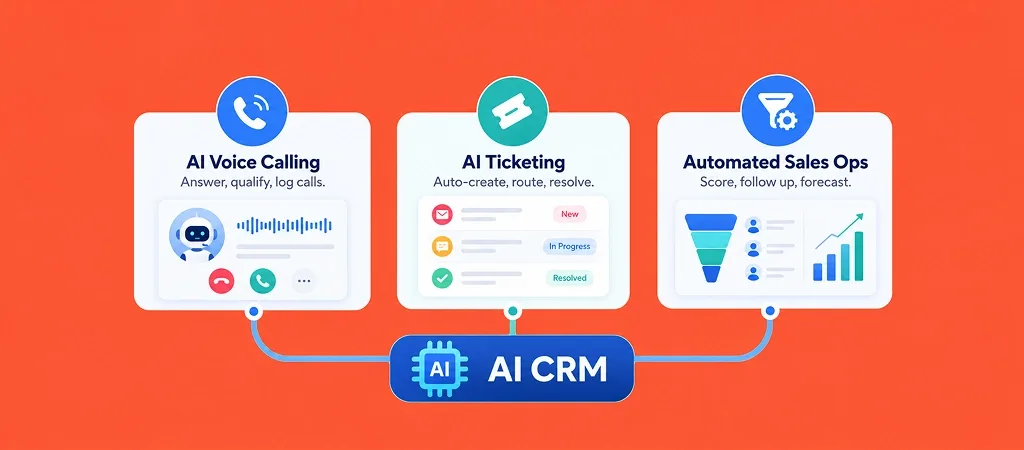
We told Rohan his problems weren't three separate issues. They were all connected, so they needed to be fixed together.
AI Voice Calling in CRM
Rohan's biggest problem was the phone. His team was often on site visits when enquiries called, and by the time anyone called back, the customer had moved on.
How AI Voice Calling Works Inside a CRMAn AI voice calling CRM picks up every inbound call instantly, even on a Sunday. It asks the questions Rohan's team would ask (budget, property type, timeline), creates the lead record during the call, and sends hot leads straight to the right designer with a summary.
For outbound, AI call automation for sales handles reminders, first-touch follow-ups, and feedback calls, so his team steps in only when a conversation is worth their time.
Key Features: Call Transcription, Sentiment Analysis, Auto Call LoggingWhat surprised Rohan most was the memory. Call transcription makes every conversation searchable, sentiment analysis flags frustrated or excited callers, and auto call logging attaches every recording and summary to the right contact. He could finally stop asking his team, "Did anyone speak to this person?"
My personal thought: "Almost every founder we spoke to while building AiEngage CRM underestimated how much revenue they lost to missed calls. Leads don't wait. If you don't pick up, someone else will. That's why we built calling right into the CRM instead of keeping it as a separate tool."
AI-Powered Ticketing and Customer Support
With calls under control, Rohan turned to support. His two executives were capable but buried under WhatsApp messages about delivery dates, warranties, and change requests.
Automatic Ticket Creation from Calls, WhatsApp, and EmailA CRM with ticketing system built in turned every WhatsApp message, email, and support call into a ticket automatically, linked to the customer's full history. His team saw the original quote and past conversations before typing a word.
WhatsApp can do more than handle customer queries. When connected to your CRM, it can capture leads, automate follow-ups, and keep customer conversations in one place. Learn more in our complete guide to WhatsApp CRM for business growth
Smart Ticket Routing and PrioritizationThis is where helpdesk ticketing automation helped the most. AI tagged each request by topic and urgency and routed it to the right person. A delayed installation complaint jumped the queue, while "when will my order arrive?" got answered instantly.
How AI Reduces Response and Resolution TimeWith routine questions handled, his team finally had time for the customers who really needed to talk to a person. In our experience, this is the first change teams notice: fewer pending messages and a less stressed team.
My personal thought: "Good support brings in more sales. A customer whose problem is solved in ten minutes is far more likely to recommend you than one who waits two days. When support and sales use the same CRM, keeping customers happy becomes part of everyday work."
Automated Sales Ops with AI CRM
The last piece was one Rohan didn't know he needed. His reps spent hours deciding who to call and chasing reminders. Automated sales operations took care of that work for them.
Lead Scoring and QualificationAI CRM for sales automation looked at form data, website visits, call responses, and past conversions to rank every lead. His reps started each morning with a prioritized list instead of a random one.
Automated Follow-Ups and Task AssignmentWith CRM workflow automation, follow-ups went out on time over WhatsApp, email, or calls, and new leads were assigned instantly by location and workload.
Pipeline Forecasting and Sales ReportingRohan stopped chasing Friday updates. His dashboard showed which deals were moving, which were stuck, and how much revenue to expect that month.
How Voice, Ticketing, and Sales Ops Work Together
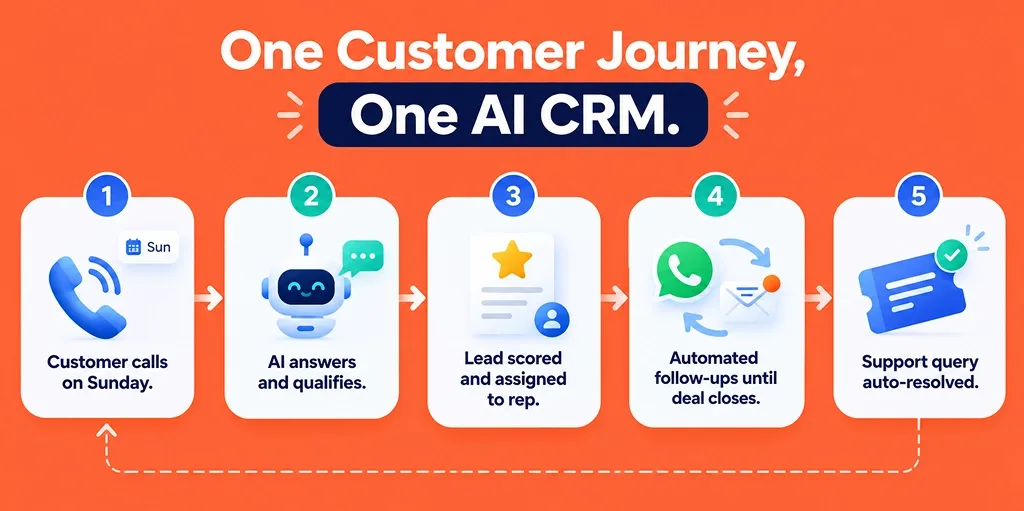
Here's how one customer now moves through Rohan's business. A homeowner calls on a Sunday, and AI answers and qualifies them. The lead scores high and lands with a designer, along with the call summary. Automated follow-ups keep them engaged until the project is signed, and a later WhatsApp question becomes a ticket resolved within minutes.
Nothing gets lost between teams, and nobody types the same details twice. That's what CRM workflow automation can do when every channel is in one place:
AI voice calling + smart ticketing + automated follow-ups = a CRM that keeps working even when your team is offline.
Case Studies: How Businesses Are Using AI CRM
Rohan's story isn't unusual. Here's how the same approach works in other industries.
Urban Nest Realty: Stopping Lead Loss from Missed Calls with AI Voice Calling
Urban Nest Realty, a 25-member Pune property agency, was missing nearly 35% of inbound calls. After moving to an AI voice calling CRM, every call was answered, qualified, and logged, with hot leads sent to the nearest agent. Within 90 days, missed calls fell below 5%, and site visit bookings rose by 42%.
GlowRoot Naturals: Cutting Support Response Time by 80% with AI Ticketing
GlowRoot Naturals, an online skincare brand, had four support agents handling 300+ weekly queries. After moving to a CRM with ticketing system features and helpdesk ticketing automation, every message became a prioritized ticket. First response time fell from about six hours to under one, and over half of tickets were resolved without human help.
SkillBridge Academy: Doubling Counselor Productivity with Automated Sales Ops
SkillBridge Academy received 2,000+ leads a month, called in random order. With automated sales operations, AI scored every lead, nurtured low-intent ones on WhatsApp, and sent high-intent ones to counselors instantly. Within one quarter, lead-to-enrollment conversion rose from 6% to 11%.
Measurable Benefits of AI in CRM
When we asked Rohan what changed most, he didn't give us one answer. He gave us a list:
Faster responses: Calls are answered instantly and routine queries resolved automatically.
Fewer missed opportunities: Every call, message, and form fill is captured, even after hours.
Higher conversions: Reps focus on the prospects most likely to buy.
Cleaner CRM data: Calls, chats, and tickets log themselves.
Better retention: Faster support keeps customers coming back and referring others.
Less burnout: Repetitive tasks move to AI, so the team focuses on real conversations.
That's why we see AI-powered CRM software as a way to add extra hands to your team without hiring.
Challenges and Limitations to Know Before You Adopt
We were honest with Rohan about the harder parts too, because knowing them early makes the switch much easier.
Data Privacy and Call Recording Compliance
Always inform callers when calls are recorded, collect consent where required, and check the rules in every region you sell to.
Data Quality and Integration Issues
AI works with the data you give it, so messy data means messy results. Rohan's old CRM was full of duplicates, so cleanup came before lead scoring, a step we recommend to every team.
When Human Judgment Still Matters
AI is good at routine work, but design consultations, price negotiations, and unhappy customers still need a real person. Let AI handle the everyday tasks and let your team handle the important conversations.
How to Choose the Right AI CRM for Your Business
Before Rohan made his decision, we gave him the same checklist we share with every founder evaluating an AI CRM for sales automation:
What to Check | Why It Matters | Question to Ask the Vendor |
|---|---|---|
Built-in voice calling | Avoids juggling a separate dialer | Does AI answer and log calls natively? |
Ticketing across channels | Keeps sales and support in one view | Are WhatsApp, email, and calls converted into tickets? |
Workflow automation | Saves hours of manual follow-ups | Can I build workflows without coding? |
Integrations | Protects your existing tool stack | Which tools do you connect with? |
Scalability and pricing | Prevents costly migrations later | How does pricing change as my team grows? |
Different industries have different CRM requirements. A real estate business may need automated lead follow-ups, while an eCommerce store may focus more on customer support and order tracking. Our guide to choosing the right CRM for your industry explains what to look for before making a decision.
How AiEngage CRM Brings Voice, Ticketing, and Sales Automation Together
We built AiEngage CRM because we kept meeting founders like Rohan, with good products, steady leads, and a CRM that wasn't helping them enough. So we brought AI calling with call intelligence, a ticketing system, a WhatsApp AI agent, AI lead qualification, and follow-up automation into one platform.
Growing teams across real estate, finance, education, and healthcare use AiEngage CRM to capture every lead and follow up without spreadsheets. As we say internally, the best CRM is the one your team doesn't have to keep updating by hand.
Rohan's evenings look different now: no missed calls, a calm inbox, and a team focused on customers instead of admin. Your business can get there too.
Ready to see what AI CRM for sales automation looks like for your business? Book a free demo with the AiEngage CRM team and let's map it to your workflow.
FAQs
Question: Can AI in CRM replace human sales reps?
Answer: No, and it isn't meant to. AI call automation for sales handles repetitive work like answering first calls, qualifying leads, and sending reminders. That frees your reps for what only people do well: building trust, handling objections, and closing complex deals.
Question: Is AI voice calling legal for sales outreach?
Answer: In most regions, yes, as long as you follow local rules on consent, disclosure, and call recording. That means telling callers when a call is recorded or AI-handled, respecting opt-out requests, and storing recordings securely. A good AI voice calling CRM tracks consent automatically, but always check the rules in each market you sell to.
Question: How does AI ticketing prioritize support requests?
Answer: AI reads each message from WhatsApp, email, or calls and identifies its topic, urgency, and sentiment. It also checks the customer's history, such as past purchases or complaints. It then resolves simple queries instantly or routes the ticket to the right agent, so urgent issues never sit at the bottom of the queue.
Question: Is an AI CRM suitable for small businesses?
Answer: Yes, and small teams often benefit the most, because every missed call hurts more when you have only a few people. AI-powered CRM software gives a small team the capacity of a much larger one, handling after-hours calls, sorting support requests, and keeping follow-ups on track without new hires.
Question: How long does it take to set up an AI-powered CRM?
Answer: Most businesses go live within a few days to a few weeks, depending on how much data you migrate and how many channels and workflows you connect. A practical approach is to start with the one area that matters most to you, like call handling or follow-ups, and expand once your team is comfortable.


I help businesses simplify marketing, sales, and customer support through AI and automation. At AiEngage CRM, we bring lead management, WhatsApp, calling, email campaigns, meetings, and support into one connected platform. Our vision is to help businesses run smarter with AI, empowering teams to streamline everyday work, strengthen customer relationships, and drive sustainable growth.